


Professional video conferencing systems: Quality and efficiency in your meetings
Do you have multiple locations or teams working remotely? Are you wasting time commuting or experiencing inefficient meetings? Do your clients and partners value agile communication, but when using platforms like Teams, Zoom, or Meet, you're experiencing poor audio or video quality?
Nowadays, virtual meetings are the order of the day in both small and large companies. Implementing a professional video conferencing system has become a strategic decision that provides clear and measurable competitive advantages.
In this post, we want to explain why investing in a professional video conferencing system based on Yealink technology can transform the way your company communicates. We'll explore the common problems this solution solves (poor audio/video quality, incompatibilities, setup time, poor user experience, etc.) and how different Yealink models can adapt to rooms of different sizes and technical needs.

Why should your company invest in professional video conferencing?
These systems are designed to address the shortcomings of conventional video calls. What are the common problems we encounter with them?
- Poor audio and video quality.
- Lack of compatibility and interoperability.
- Cumbersome setups and wasted time.
- Bad user experience.
Poor-quality virtual meetings negatively impact productivity and a company's professional image. In fact, poor video quality can derail a meeting in seconds, creating a poor experience that frustrates both participants and the IT department.
By installing a dedicated set of cameras, microphones, speakers, and optimized software, you get a comprehensive and stable solution where everything just works: the meeting starts with a click, and the picture and sound are crystal-clear, regardless of the platform.
Advantages of video conferencing with Yealink
1. Superior audio and video quality
The most noticeable difference when using a professional system is the HD/4K quality of video and audio.
Its 4K PTZ cameras with optical zoom and advanced optics automatically focus on each participant in detail, even in large rooms. They also avoid the typical pixelated or blurred video seen with traditional webcams.
In audio, its intelligent microphone arrays and calibrated speakers incorporate active noise cancellation and voice tracking using Artificial Intelligence. Echoes and background noise are eliminated, ensuring that only the speaker's voice is heard.
2. Hassle-free integration and interoperability
A generic system can be difficult to connect to different platforms, but Yealink solutions are certified for Microsoft Teams, Zoom, Google Meet, and others. You can connect with customers or partners regardless of the platform they use, without the need for complex additional configurations or the risk of "no-see/no-hear" when you get started.
Additionally, the devices integrate with your existing IT infrastructure (such as VoIP switchboards, room booking systems, calendars, etc.), making the transition very simple. In large companies, this integration with unified solutions enables completely centralized IT support.
3. Savings in operating costs and time
On the one hand, it reduces the need for travel: many meetings can be held virtually, saving on transportation and accommodation costs, and time that can be spent on more productive tasks.
On the other hand, Yealink equipment is low-maintenance and long-lasting: it is designed with robust hardware and can be updated via software, reducing replacement costs or breakdowns.
Advanced video conferencing systems are ideal for your technical team: as optimized plug-and-play solutions, meetings start on time, without the typical 15-minute "can you hear me? I can't see you" conversations that come with home-based equipment. In Yealink systems for Teams Rooms, for example, the interface is ready to join with a single touch, with no learning curve.
4. Professional user experience and improved corporate image
Offering stable, high-definition, and seamless video calls makes a good impression on clients and partners. Think of the difference: a meeting with echoes and people constantly asking "can you repeat it?" isn't the same as one where the audio is clear and the camera automatically focuses on the speaker.
Having dedicated hardware in the room (motorized PTZ cameras, touch control panels, etc.) elevates the meeting experience compared to doing everything from a laptop. It also helps improve customer service and collaboration: for example, you can provide remote training or guided technical support with high-quality video, or conduct live product demonstrations showing every last detail.
5. Scalability for rooms of all sizes
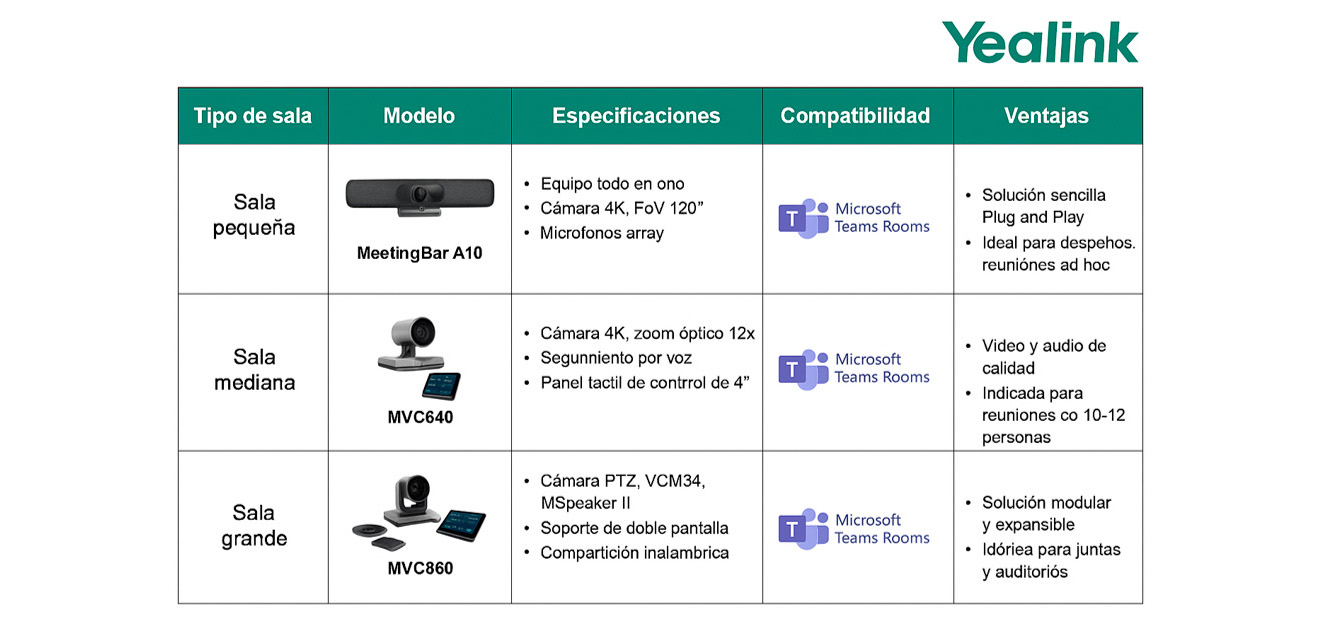
You can scale the solution according to the size of your rooms and your needs. From small spaces like home offices or huddle rooms to executive or boardrooms, there's a Yealink device for every situation.
You can standardize technology across the company while maintaining the same user experience, but choosing the right equipment for each room. For example, there are all-in-one video bars designed for smaller rooms, as well as modular kits with longer-range PTZ cameras and multiple microphones for larger rooms. All of them integrate consistently under the same platforms (Teams, Zoom, etc.). On a technical level, it's easy to expand: if your company grows, simply add more Yealink endpoints to the ecosystem.
Centralized remote management allows the IT department to configure, monitor, and update all equipment from a single console, without having to physically go room by room.
6. More agile meetings and faster decisions
With a good system, starting a video conference takes seconds, and you won't experience technical interruptions during the session. It shouldn't be a barrier, but rather facilitate immediate communication.
Companies that adopt quality video conferencing are able to accelerate sales processes (for example, by conducting more remote demos and reaching closing dates faster), improve the coordination of their distributed teams, and resolve issues in real time.
Imagine being able to bring your sales and technical teams, and the client, together in minutes to review a prototype via 4K video and screen sharing, instead of coordinating schedules for a physical meeting days later. Hold instant meetings with features like HD recording or the use of collaborative whiteboards, especially useful in environments like customer support or contact centers where sessions can be reviewed for quality control.
In short, professional video conferencing systems are not a luxury, but a competitive necessity for any company looking to offer secure communication, streamline operations, reduce costs, and strengthen customer relationships.
Benefits according to the professional profile
| Target customer | Main benefits |
| SMEs and associations | Compact, all-in-one equipment that's easy to install. Reduced travel. Professional image. |
| Large companies | Scalability, integration with VoIP systems, modular rooms, centralized IT support. |
| Foundations and cooperatives | Affordable and easy-to-adopt solutions. Helps improve communication with partners and branches. |
| Contact Centers or support companies | Remote training and management of teams or clients with HD quality and session recording. |
Solutions according to the size of the room
Conclusion
Implementing a Yealink professional video conferencing system is like setting up a real-life meeting room, but anywhere in the world. It provides quality communication, technical reliability, and ease of use, allowing you to focus on the content of your meetings and not on technological issues.
If your company is looking to streamline decision-making, reduce costs, and project an innovative image, this technological investment will be a wise move. Are you ready to take the leap to borderless communication with Yealink?
Contact us to request your personalized quote with no obligation. And follow us on LinkedIn to keep up to date with all the latest news.
